For one traveller spending seven calendar days in Japan, 10GB is the most useful starting point—not because it is a universal average, but because it covers a normal city trip while leaving room for one or two burst days. Choose 5GB when mobile data is mainly maps, messages and tickets and bulk media waits for Wi-Fi. Choose 20GB when several days include video uploads, long attraction days or occasional laptop tethering. Buy unlimited only when heavy use repeats often enough that a fixed pool becomes inconvenient.
The better sizing method is baseline + burst reserve. Count how many genuinely full travel days you have, estimate the low-friction data you need every day, then add a reserve for the one or two days most likely to spike. Arrival and departure may be short days for data volume, but they are high-value days for connectivity, so do not remove them from the validity calculation.
The 30-second decision
↔ Scroll table left or right
Your seven-day pattern | Start with | Why | Main boundary |
Maps, messages, translation and tickets; uploads wait for Wi-Fi | 5GB | Enough for a disciplined travel-tool setup without paying for media capacity you will not use | Automatic backup or a single video-heavy day can consume the margin quickly |
Normal Tokyo–Kyoto–Osaka trip with daily social use | 10GB | Good baseline plus reserve for one or two heavier days | Repeated tethering or creator uploads can justify 20GB |
Several video-heavy days, long event days or occasional laptop use | 20GB | Total pool lets light days subsidise heavy days | If heavy use repeats nearly every day, transparent unlimited can be simpler |
Repeated work blocks / hotspot / large uploads | Unlimited or a large fixed pool | The expensive failure is losing high-speed data during a critical task | Unlimited can still throttle after a daily threshold |
Two people sharing one phone | Choose the sharing architecture first | Battery and separation risk can matter more than raw GB | Two smaller independent lines or a tiny backup line may be more resilient |
Step 1: count full travel days, not just calendar dates
A “seven-day trip” often contains only five full sightseeing days. Day 1 may begin with a 17:00 arrival; Day 7 may end with a morning flight. That means your bulk data demand can be lower than seven identical sightseeing days.
But do not make the opposite mistake and treat the bookend days as irrelevant. Arrival and departure are often the days when live data has the highest operational value: airport transport, hotel messaging, rail disruption, baggage, taxi apps and terminal navigation.
Use two separate counts:
Full-use days: days when you expect many hours away from hotel Wi-Fi.
Critical-connectivity partial days: arrival and departure periods where the data volume may be low but losing connectivity would be costly.
This distinction keeps you from overbuying gigabytes while still buying enough validity.
Step 2: build a baseline before adding the heavy days
Your baseline is the mobile data you expect on an ordinary sightseeing day: maps, train searches, messages, translation, restaurant pages, attraction apps and occasional photos. It should exclude large tasks that can wait for Wi-Fi, such as operating-system updates, full photo-library backup and long video uploads.
You do not need a fake “average traveller uses X MB” statistic to size this. Start from behaviour:
If the phone is mainly a navigation and communication tool, the baseline is low.
If social video is part of every day, the baseline is higher.
If the phone also feeds a laptop or second traveller, the architecture changes before the number does.
The 1GB/day vs 2GB/day vs total-data guide is the better page when the product itself uses a daily bucket. This article sizes a seven-day total allowance.
Step 3: add a burst reserve for the two days most likely to spike
Most seven-day trips are not digitally uniform. One day may be temples and neighbourhood walking; another may be a theme park, exhibition, long Shinkansen transfer, weather disruption or creator day.
The useful question is: what are the two days most likely to use materially more data than the baseline?
Common burst days include:
Tokyo Disney Resort or USJ, with long app use, photos, video and group messaging;
an airport or intercity transfer day with live route changes;
a day away from hotel Wi-Fi from early morning to late evening;
a laptop-tethering or video-call block;
a creator day with repeated high-resolution uploads.
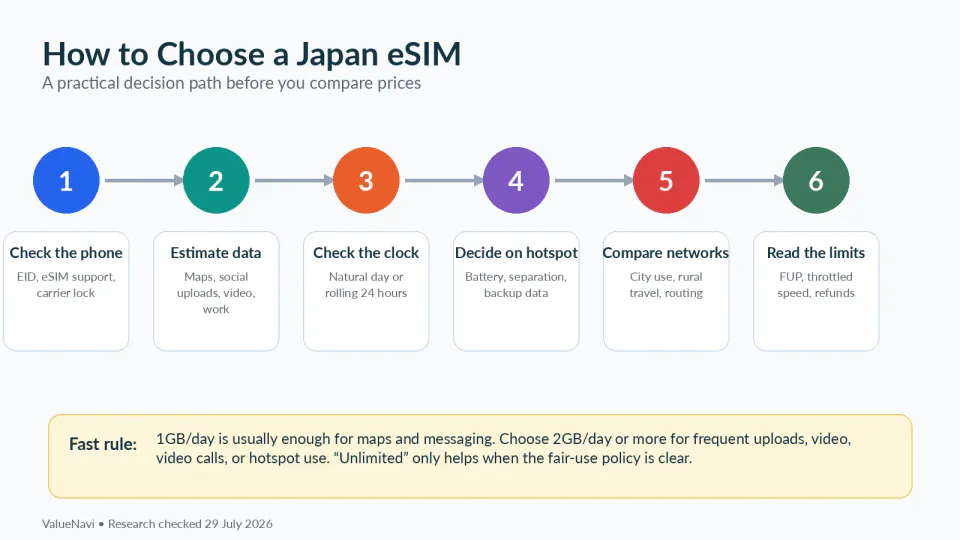
A 10GB plan is a strong default because it can combine a modest baseline with a meaningful burst reserve. A 20GB plan becomes rational when the reserve is no longer occasional—it is required on several days.
5GB: choose it when you are willing to control four background behaviours
Five gigabytes can work well for seven days when mobile data is deliberately used for travel rather than bulk media.
Move these to Wi-Fi:
automatic photo and video cloud backup;
app and operating-system updates;
long-form or high-resolution streaming;
large downloads and laptop cloud sync.
The trade-off is attention. If you keep checking the data meter before every upload, the plan may be financially cheap but mentally expensive. When the next tier costs only modestly more, 10GB can be a better purchase simply because it lets you stop managing the allowance.
Airalo currently lists a 5GB / 7-day Japan package at US$10. Saily currently lists 5GB / 30 days at US$10.99. Prices change, but this illustrates a broader point: a much longer validity window can sometimes cost almost nothing extra.
10GB: the default because it buys a burst reserve, not because 1.43GB/day is magic
Ten gigabytes across seven days equals about 1.43GB per calendar day if divided evenly. I would not use that number as the recommendation. A total-data plan does not require even use.
The advantage is flexibility. Five light days can leave a large reserve for a theme-park day or a transfer day. That is more useful than trying to force every day into the same quota.
When checked on August 25, 2026, Airalo listed 10GB / 7 days at US$17 and Saily listed 10GB / 30 days at US$17.99. A one-dollar difference is too small to make price the main decision. Activation rules, network, hotspot requirements, support and whether the extra validity is useful should carry more weight.
ValueNavi rule: when similar-capacity products are within roughly the cost of a coffee, optimise the failure mode rather than the sticker price.
20GB: buy it when the burst reserve stops being exceptional
Twenty gigabytes becomes useful when several days include video uploads, repeated video calls, event coverage, long periods away from Wi-Fi or occasional laptop tethering.
The key comparison is against unlimited. If only one or two days are heavy, a 20GB total pool can be more flexible because quiet days subsidise those spikes without a daily high-speed threshold. If nearly every day is heavy, unlimited becomes easier to justify.
Current examples show how little value there can be in matching validity exactly. Airalo currently lists 20GB / 15 days at US$24 and 20GB / 30 days at US$25. Saily currently lists 20GB / 30 days at US$24.99. For a seven-day trip, the unused days are not automatically waste if the product is otherwise cheaper or safer.
Unlimited: compare the daily high-speed window, not the word
Airalo currently sells a seven-day unlimited Japan package at US$27. Its current fair-use default gives 3GB of high-speed data per rolling 24-hour period, then 1Mbps until the 24-hour window resets from activation.
Saily’s current Japan unlimited product publishes 5GB per day without a speed limit, followed by unlimited data at up to 1Mbps. Its current Japan inventory uses a 15-day unlimited package rather than a dedicated seven-day unlimited option.
Klook’s current Japan listing 109393 publishes a different shape again: 10GB/day at full speed on the selected unlimited tier, then 128kbps.
Those structures answer different needs:
↔ Scroll table left or right
Published structure | High-speed allowance | Fallback | Best fit |
Airalo unlimited default | 3GB / 24h | 1Mbps | Moderately heavy use with a usable reduced-speed safety net |
Saily Japan unlimited | 5GB/day | Up to 1Mbps | Heavier daily hotspot or upload use |
Klook 109393 unlimited | 10GB/day | 128kbps | Large burst use when staying under the threshold is realistic |
If you normally use less than 3GB even on the heavy days, unlimited may add little over a large fixed pool. If you repeatedly use 4–5GB, the larger daily high-speed window becomes meaningful. If you need 8GB of full-speed laptop data on one workday, neither the word “unlimited” nor a 1Mbps fallback should be mistaken for guaranteed full-speed work capacity.
A seven-day trip does not require a seven-day-labelled product
This is one of the easiest ways to improve value. Search by capacity + activation fit, not by the duration filter alone.
A 30-day fixed plan can be sensible for a seven-day trip when:
the price is nearly the same as the short-validity option;
validity begins cleanly on destination connection;
the extra calendar margin protects a delayed arrival or extended trip;
you are not buying so far in advance that the provider’s purchase-to-activation window becomes a problem.
Saily currently gives purchased plans a 30-day activation period before automatic activation, so “long validity” and “buy as early as possible” are separate questions. The rebuilt installation and activation guide handles that timing.
Late arrival: a longer-validity fixed plan can be cheap insurance
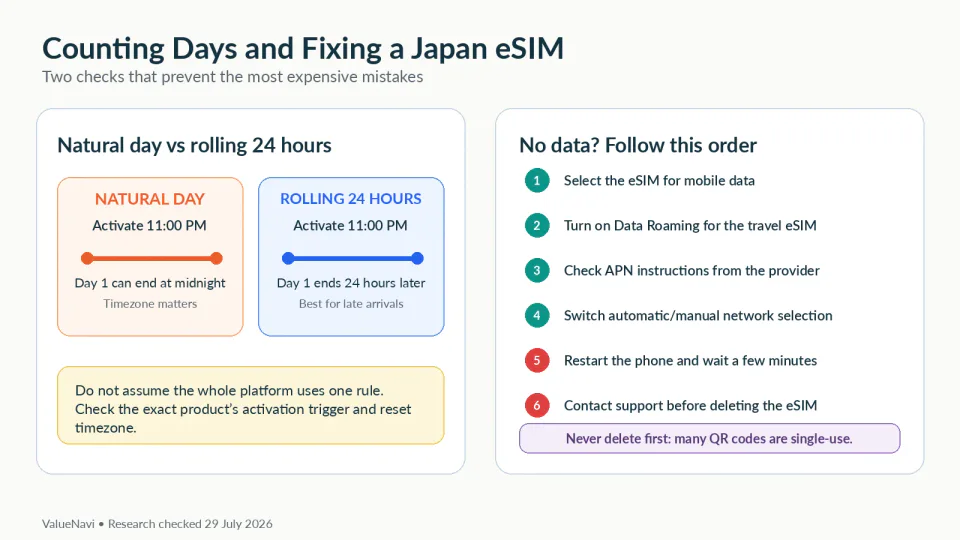
A 23:30 arrival does not necessarily use much data, but it can create a validity problem if the selected product counts calendar days. Other products use rolling periods. Airalo’s unlimited fair-use cycle, for example, resets every 24 hours from activation rather than at midnight.
Do not choose a seven-day package only because the itinerary spans seven dates. Count from the first moment live data becomes useful to the final airport transfer, then inspect the exact validity clock.
The late-arrival validity guide now separates installation, activation, overall validity and daily reset timing.
Two travellers: size the system before sizing the plan
If two people intend to share one hotspot, data size is only one part of the decision. The host phone becomes the battery, proximity and network single point of failure.
The rebuilt two-person hotspot guide compares three architectures: one large shared plan, two independent smaller plans, and one large primary plan plus a tiny backup line.
Choose that architecture first. Then decide whether the main allowance should be 10GB, 20GB or unlimited.
A seven-day sizing worksheet
Use this before checkout:
How many full-use days? Ignore partial arrival/departure hours for bulk demand, but keep them in validity.
What is the baseline? Maps/messages/tickets only, or daily social/video?
Which two days can burst? Theme park, work, event, long transfer, hotspot?
Can bulk traffic wait for Wi-Fi? If yes, 5–10GB gets stronger.
Will heavy use repeat? If yes, 20GB or unlimited gets stronger.
Does validity cover both airport bookends? Do not save data money and lose connectivity on departure.
Final verdict
5GB: choose it when the phone is mainly a travel tool and large media waits for Wi-Fi.
10GB: the best starting point for a normal seven-day city trip because it gives you a useful baseline plus room for one or two burst days.
20GB: choose it when several days are genuinely heavy but you still prefer the flexibility of one total pool.
Unlimited: choose it when heavy demand repeats often enough that the fixed pool becomes inconvenient; then compare the daily high-speed allowance and the fallback speed.
The most important correction is that seven days is not the sizing formula. Full-use days size the baseline; burst days size the reserve; airport bookends size the validity.
References
Airalo — Japan plans · Airalo — Unlimited Fair Use Policy · Saily — Japan plans and activation window · Klook — Japan eSIM listing 109393. Checked August 25, 2026. Prices, package structures and fair-use terms can change; verify the exact SKU before payment.